For my Surrealist Portrait, I got a picture of Nicholas Cage off the internet and used different types of fruits and vegetables to make up his famous face.
Tuesday, February 10, 2015
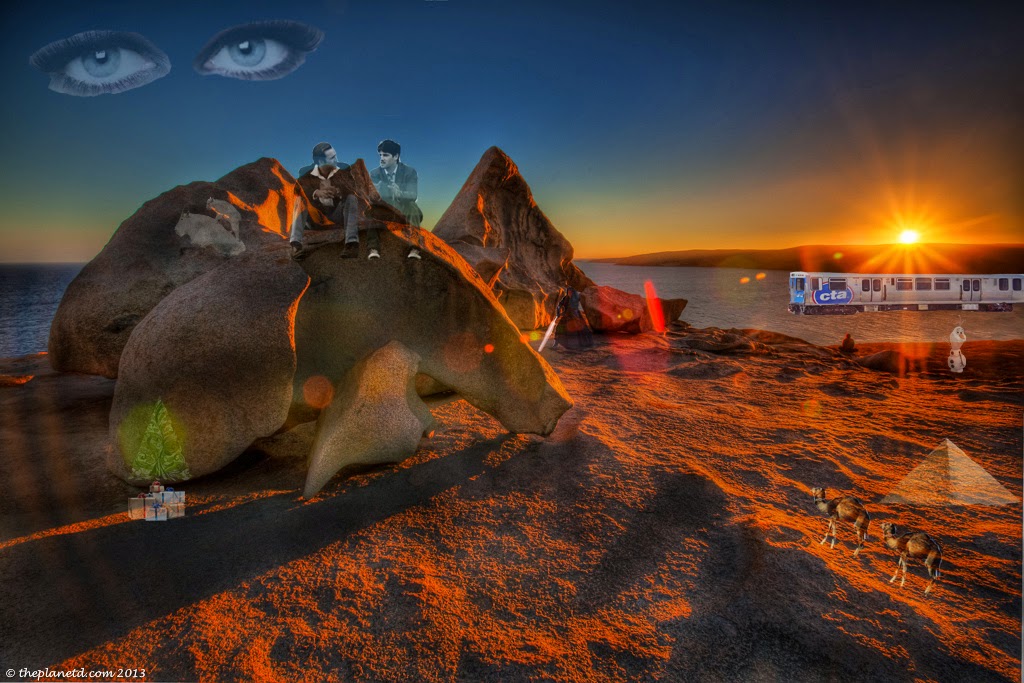
Surrealist Landscape
For my Surrealist landscape, I dropped in images from the internet and used a low opacity eraser to blend them into the background.
Tuesday, January 27, 2015
Georgia O'Keeffe Painting
Using the paintbrush tool, I used different shades of reds, pinks and purples on the petals. I blended the colors together using the blur tool and smudge tool. I blended different shades of yellows and oranges with the smudge tool and blur tool. At the very center, I used different shades of a dark purple and blended them together with the smudge tool.
Monday, January 26, 2015
Creating a New Logo
I enjoy watching shows like Castle and Once Upon a Time which are on ABC. For my logo, I colored the background a light metallic blue and made everything on it darker. On the ABC logo, I added other logos from different channels that might interest the watcher. ABC has a family channel and a news channel, that is why I added the "family" stencil and "news" stencil on either side of main icon.
Friday, January 23, 2015
Post-Impressionist Portrait
For my portrait, I used an image that I had taken for my digital photography card. I used a special effect brush to create the dotted texture it created on the image. I used colors from the original picture to create dots of the same color. This gave the image the post-impressionist look.
Formal/Informal Balance
For my informal balance picture, I colored the wall brown and smoothed it down using the smudge tool. Then I created stencils of floral wallpapers. I placed them in opposite corners to make the different on both sides. On the left, I also added another floral design to make the differences stand out more.
Subscribe to:
Posts (Atom)